A practice and project management web app for architects
See where every project has been, and where it's headed.
AsDrawn brings your timesheets, projects and firm financials together, measured and forecast based on the AIA's Architect's Handbook of Professional Practice.
Built for architecture
1.0Shaped around design phases, fees and change orders.
- 01
Phases, not generic tasks
AsDrawn tracks SD, DD, CD, bidding and CA, each with its own share of the fee.
- 02
Hourly, lump sum or % of construction
Set each project up on the fee type in your contract. Change orders add to the phase where the extra work happens.
- 03
A staff meeting with answers
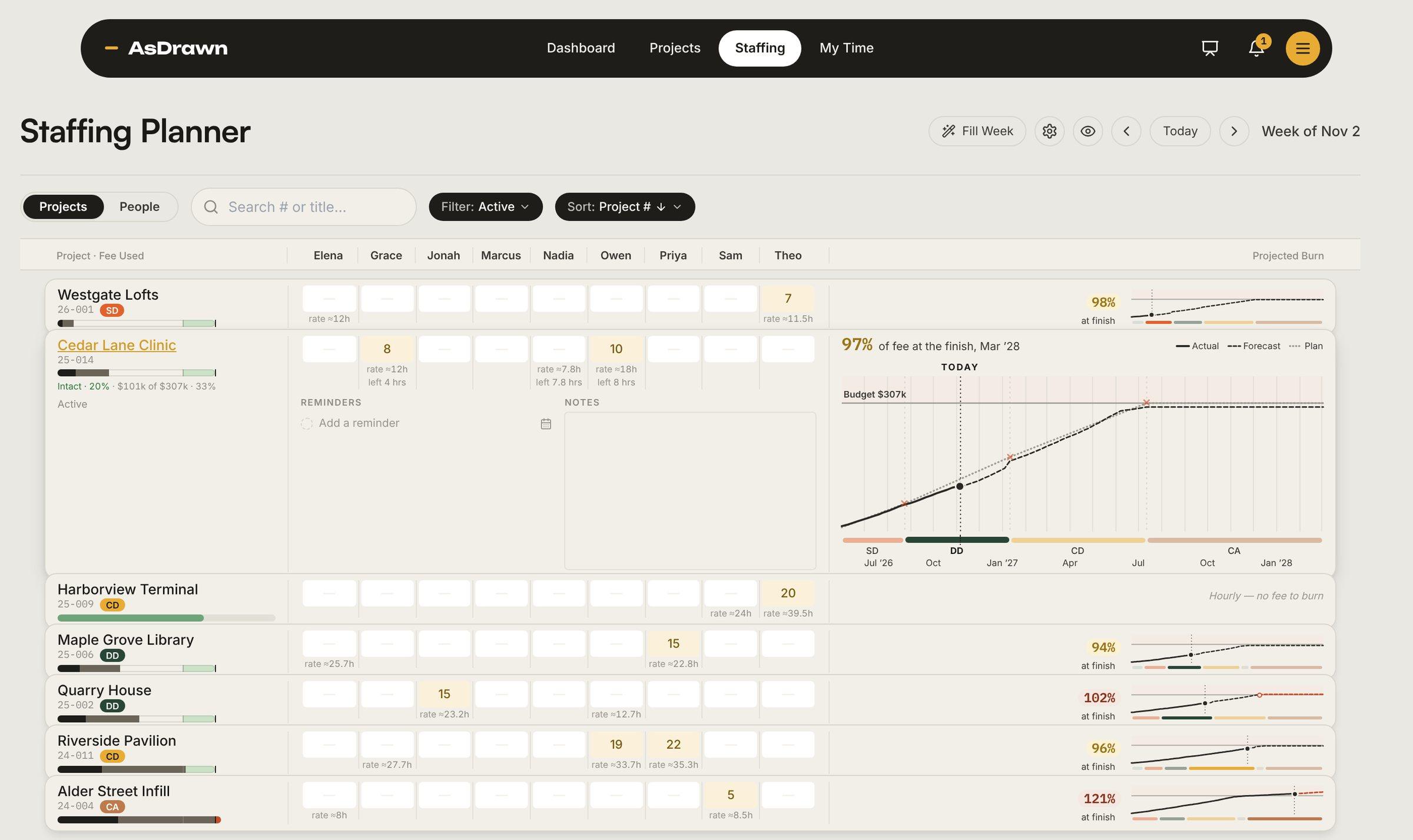
Hours, fees and staffing sit on one screen, with who is out this week and in the weeks ahead, so you can see who is overloaded.
Fee burn
2.0Every phase's fee, in one clear picture. From the first timesheet to the finish.
24-017 · Cumulative fee burn
Riverside Branch Library
96%of fee at the finish, Jan '27· $13k under
- Maya Reyes
- Jonah Tate
- Ava Lin
- Sam Kowalski
The weekly staff meeting
3.0Staff the weeks ahead. See where each fee lands before you commit.
Invoicing
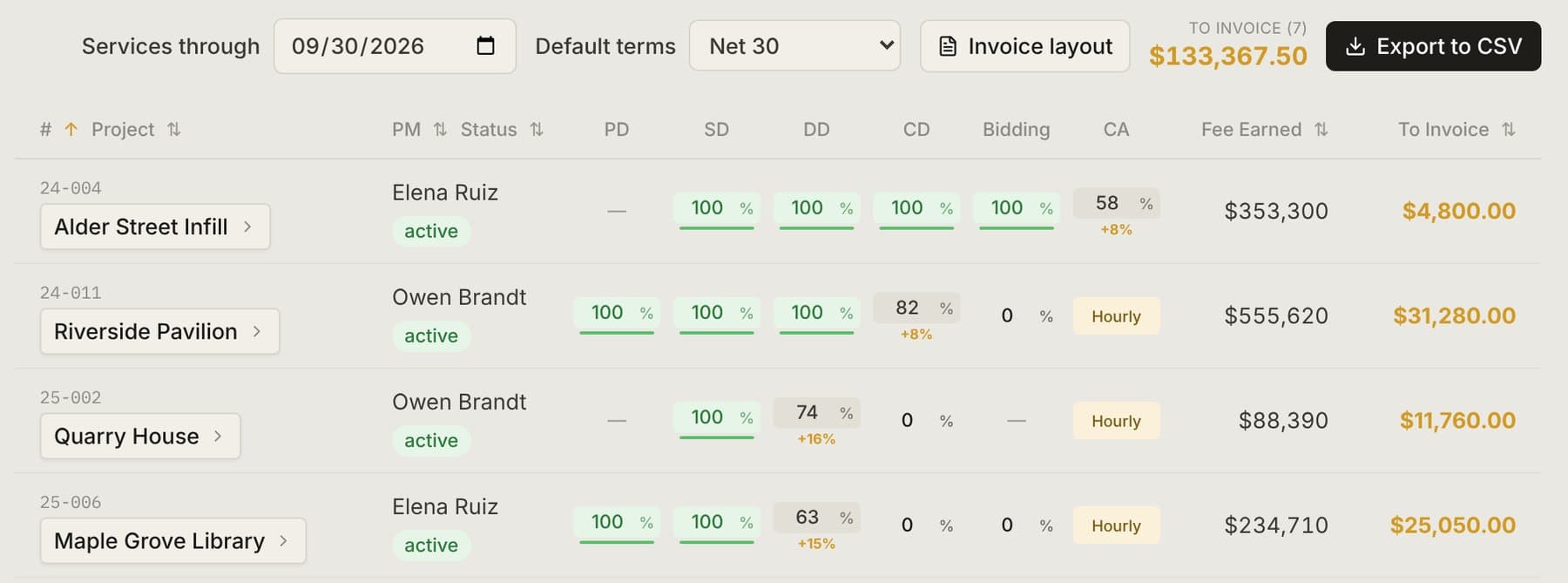
4.0Invoice the whole firm in minutes.
Three ways in
5.0One source of truth, in the app, your code or your AI.
AsDrawn App
The web app: timesheets, phase fees, staffing and invoicing, with every project’s health at a glance.
$25 per user / month
AsDrawn API
Coming soonBring hours in from other timesheet tools, send invoices to your accounting software, and post overrun alerts to Slack or Teams.
Included with a subscription
AsDrawn MCP
BetaConnect Claude, ChatGPT or Copilot to your firm, and ask which projects are slipping in plain English.
Included with a subscription
$ curl api.asdrawn.net/v1/projects/24-017 \-H "Authorization: Bearer $KEY"{"project": "24-017 Riverside","fee": 375000,"percentComplete": 0.44,"feeUsed": 0.41,"health": "healthy"}
Find gaps and potential efficiencies in our staffing for the next six weeks.
AsDrawn · staffing_forecast
Ava Lin is overbooked at 46 hours a week through mid-December, mostly Harbor Street Lofts CDs. Sam Kowalski has about 12 hours a week open in the same stretch.
Moving Sam onto Harbor Street's CD redlines levels both of them, and puts a cheaper hour on the phase that's already over its fee. Riverside's CA has nobody booked after January 12.
Built by an architect
6.0Made by an architect, for the way firms really run.
AsDrawn was built by St. Louis registered architect Zack Ebbers, who likes Excel way too much.
The app's formulas follow concepts from the AIA's Architect's Handbook of Professional Practice, so overhead rate, utilization and multipliers are tailored to how architecture firms work.
It's a good fit if your firm:
- Practices architecture or interior design
- Sets fees by phase, from SD through CA, so overruns come out of profit
- Keeps "the spreadsheet" up to date by hand
- Wants to see who's staffed where, and forecast the weeks ahead
How to start
7.0From checkout to billing your first client.
Today
Today
Subscribe
Pick monthly or yearly and check out with Stripe.
Within a day
Within a day
Get your login
Your data import specialist emails your login and a private link for your files. A setup checklist in the app shows what it needs.
Week 1
Week 1
Send what you have
Upload whatever you track in now: Excel, CSV, PDFs, even photos of a sheet. Projects, fees, people and past hours. Send a few past invoices too, and we'll match your invoice layout and logo.
Weeks 1–2
Weeks 1–2
We import it, free
We set up your projects, phases, fees and team from your files.
Week 2
Week 2
You sign off
Check the numbers and approve them. From then on the data is yours to edit.
Then
Then
Start timesheets
Your team logs hours against real projects, and the fee burn starts filling in.
Month end
Month end
Bill your first client
At the end of your first month on timesheets, invoice your clients straight from the logged hours.
$25 per user / month billed yearly, or $30 monthly, with a 4-seat minimum. Admin seats are free.